Imagine — image generation
Imagine is the still-image studio: describe a picture, choose a model, style, shape, and how many, and a batch arrives in seconds. Around that core sit the tools that make results repeatable — styles you can save, characters you can reuse, a brand the images stay consistent with — and the honest accounting of what a batch costs. This page walks the composer, the levers, and what happens to the images afterwards.
The composer
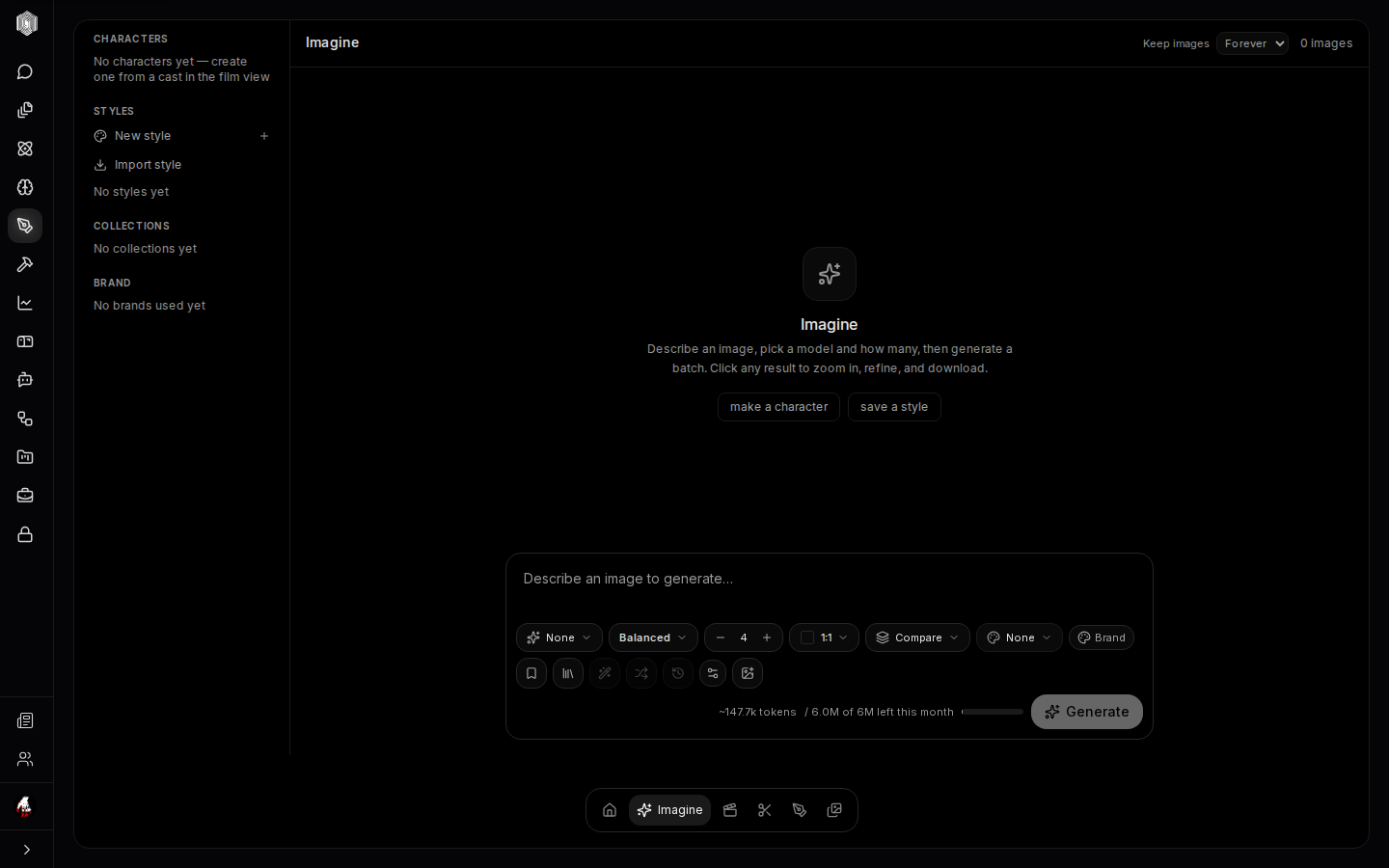
The composer is the floating box at the bottom of the sandbox: a prompt field — "Describe an image to generate…" — and a row of levers under it. The model picker chooses which generator runs; different models have genuinely different tastes, and the honest approach is to run the same prompt past two of them. Quality trades speed against polish (Balanced is the sensible default; the top setting is for the prompt you have already iterated into shape). The count sets the batch size — more images per batch means more to choose from and more of the month's allowance spent. Aspect fixes the shape (square, portrait, cinematic), and the Compare control renders the same prompt against two settings so you can judge rather than guess.
A second row of small buttons carries the quiet features: a negative prompt (things the generator should avoid), reference-image attachment for prompting with a picture, and the brand toggle described below. Press Generate and the batch lands in the sandbox above; click any result to zoom, refine it further, or download it.
Styles, characters, and brands
The left rail is where consistency lives. Styles are one-tap looks — Cinematic, Photographic, Anime, 3D Render, Watercolour, Product, Cyberpunk, Pixel Art, Line Art, and more — that append a curated modifier to your prompt at generation time, so your typed words stay clean while the look is applied exactly the same way every time. Any image can be salvaged as a New style, so a look you honed by trial becomes one tap forever; styles can also be imported from a snippet of description.
Characters solve the hardest problem in generation: the same face twice. A character is a saved identity the generator can reference, so a hero illustrated on Monday can star in a new pose on Friday. Brands (fed by the design workspace — page four) apply your palette, type, and logo sensibilities to a generation, which is the difference between "an image for the brand" and the brand's image. The rail's Collections group results you are keeping together for a project.
Refining: zoom, inpaint, iterate
A generated image is a first draft, and Imagine treats it that way. Clicking a result zooms into its detail view — the full prompt, model, and settings that produced it, so you can re-run a close variant — with actions to download it, run variations, or send it onward. Inpaint mounts a canvas over the image: mask the region that is wrong, describe what should be there, and only that region regenerates; the rest of the image is preserved. Iteration beats re-rolling: a batch of four with one inpainted fix is cheaper, faster, and more faithful to the idea than forty fresh rolls.
The queue strip keeps honest books on in-flight batches — what is generating, what finished, what was cancelled — and a finished batch can be downloaded as a zip in one action.
What it costs and how long it keeps
Generation is metered, and the composer shows the estimate before you spend: the button row carries a live token meter — this batch's approximate cost against what remains of the month. That meter is the reason the levers exist: a Balanced-quality batch of four costs a fraction of a maximum-quality batch of eight, and the difference is usually invisible in a first iteration.
Retention is a choice, made explicitly: the Keep images control in the header spans from a short grace period to Forever. Whatever you pick, the sandbox says how many images it is holding, and anything worth keeping long-term should be downloaded or saved into the Library — the catalog that outlives the sandbox's retention window.
Getting results out
Every image can be downloaded on its own, a batch as a zip, or — the better path — saved into the Library, where it joins every other durable asset with its prompt, model, and origin attached. From there it is one click to a project, searchable by the words that made it, and visible to the rest of the platform. Images generated with a brand applied carry that consistency into whatever they land in, which is the quiet superpower of the chain: Imagine to document, Imagine to deck, Imagine to film reference — all without a screenshot tool in sight.