The trading terminal
The trading terminal is where you look at one token and decide what to do about it. It fills the screen with three columns: a list of tokens on the left, the token's chart in the middle, and the numbers that describe it on the right. You reach it by clicking Markets in the dock, or by clicking any token anywhere in the trading section — every chart icon, every coin row, and every search result eventually points here, so the terminal is the room the whole section keeps returning to. The questions it exists to answer are always the same three: what is this token, what has it been doing, and what would it cost me to act on it — arranged left to right in that order.
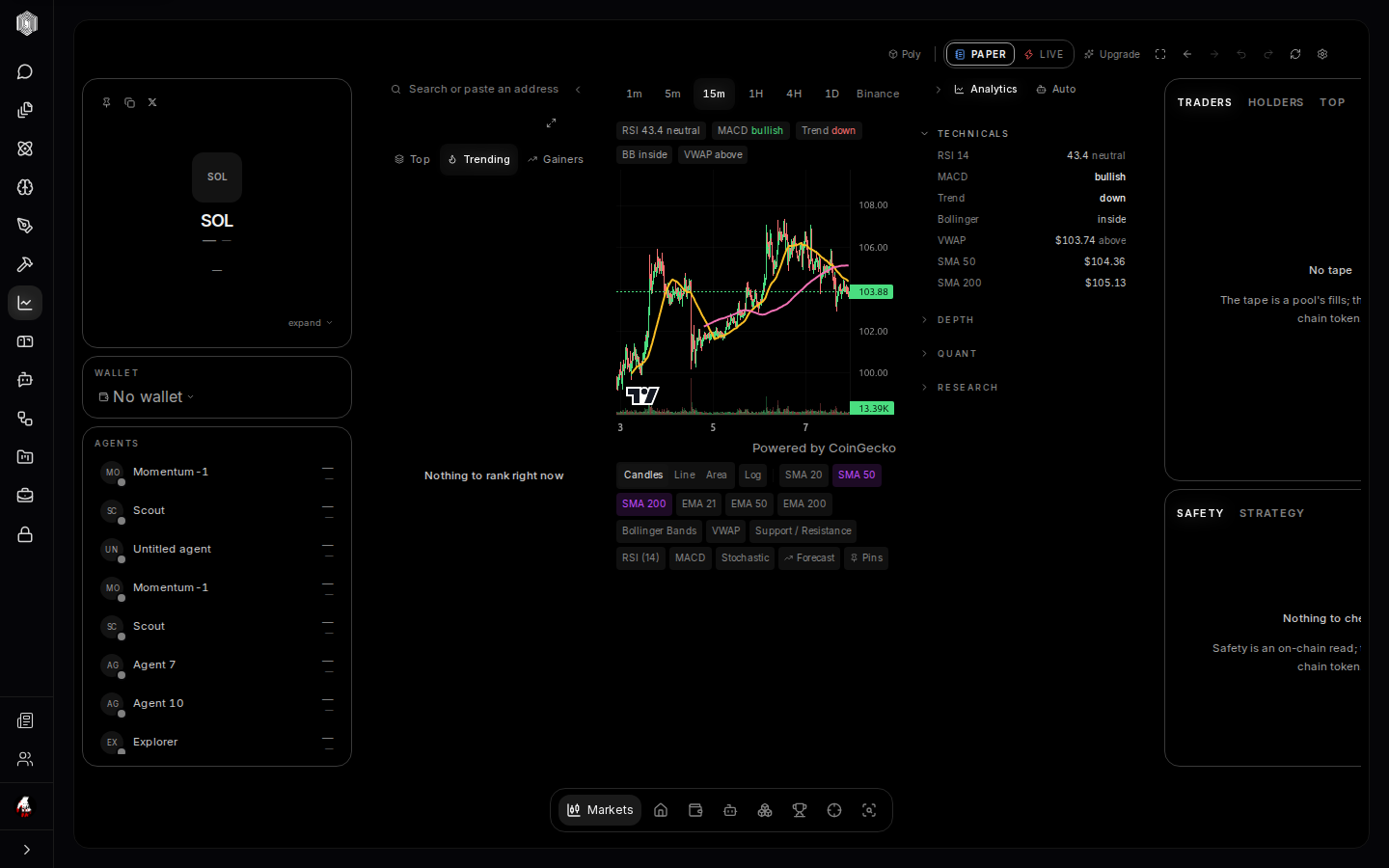
The token rail — picking what to look at
The left side is how you steer. The tabs above it — Top, Trending, Gainers — rank live markets, and the search box accepts a name or a pasted address. Clicking any row re-points the entire terminal at that token: the chart, the reads, the ticket, everything. When you arrive with a token in mind, search for it; when you arrive with no idea, ride the trending list and see what the day looks like. The ranking is the same one the coin-search page uses, so a token you star there will be easy to find here.
The token card — what is this thing
In the top-left sits the token's identity card: its icon, name and ticker, price with the 24-hour change, and market cap. The small buttons beside it pin the token (keeping it one click away), copy its address, and open its profile on X. Click the card to expand it and the useful parts unfold: liquidity (how much money sits in the token's trading pool — thin liquidity means even modest trades move the price), total supply, the top ten holders with their share, and the project's social links. Read this card before you buy anything; it answers "what exactly am I looking at" in ten seconds.
The chart — reading the price
The center of the screen is the price chart. Each candle is one slice of time (change the slice with the 1m–1D buttons at the top): green means the price rose during that slice, red means it fell, and the thin wicks show the extremes it reached. The colored lines laid over the candles are moving averages — the price smoothed out over 20, 50, or 200 slices — and the toggles below the chart turn each one on or off, alongside extra indicators like Bollinger Bands, VWAP, RSI and MACD. Strip the chart down to bare candles or load it with guides; the chips remember what you chose. The timeframe row above (1m through 1D) changes what one candle means, from a minute's noise to a day's story.
Trades on the chart
The chart is also where activity appears. Trade bubbles land on the candles as trades happen — your own fills and larger trades worth noticing. Click a bubble and a small card opens: who traded, how much, at what price, with a link that opens that wallet in the Explorer. Clicking a candle narrows the side panel to that slice of time, which turns "why did it jump at 3pm" into a two-click answer. Between the bubbles and the candle click, the chart stops being a picture and becomes a record — and a record you can interrogate is worth more than any prediction you will read about the same token.
The wallet panel and the ticket — actually trading
Below the token card is the wallet panel: which wallet is in use, what it holds, and the Buy / Sell ticket. Pick a side, type an amount (or tap a preset), and the ticket fetches a live quote — what you receive, with the route details folded underneath until you ask. Nothing moves until you confirm, and the confirmation restates everything in plain terms. Selling works the same way in reverse: presets like "1 SOL" sell whatever that amount of SOL is currently worth in the token. If the connected wallet is read-only, the panel says so plainly — you can look, but it cannot sign.
The right column — traders, holders, and the tape
The right side answers "who is in this token with me." The Traders tab is the live tape: every trade scrolls past — side, size, price, wallet — which gives you a feel for whether the room is busy or dead. The Holders tab lists the biggest stakes with a bubble map that makes concentration visible at a glance; if one wallet holds half the supply, you want to know that before you buy. The Top tab rolls traders up: biggest buyers, biggest sellers, net flow. Three tabs, one question — is company arriving or leaving.
Safety and strategy — the read before the trade
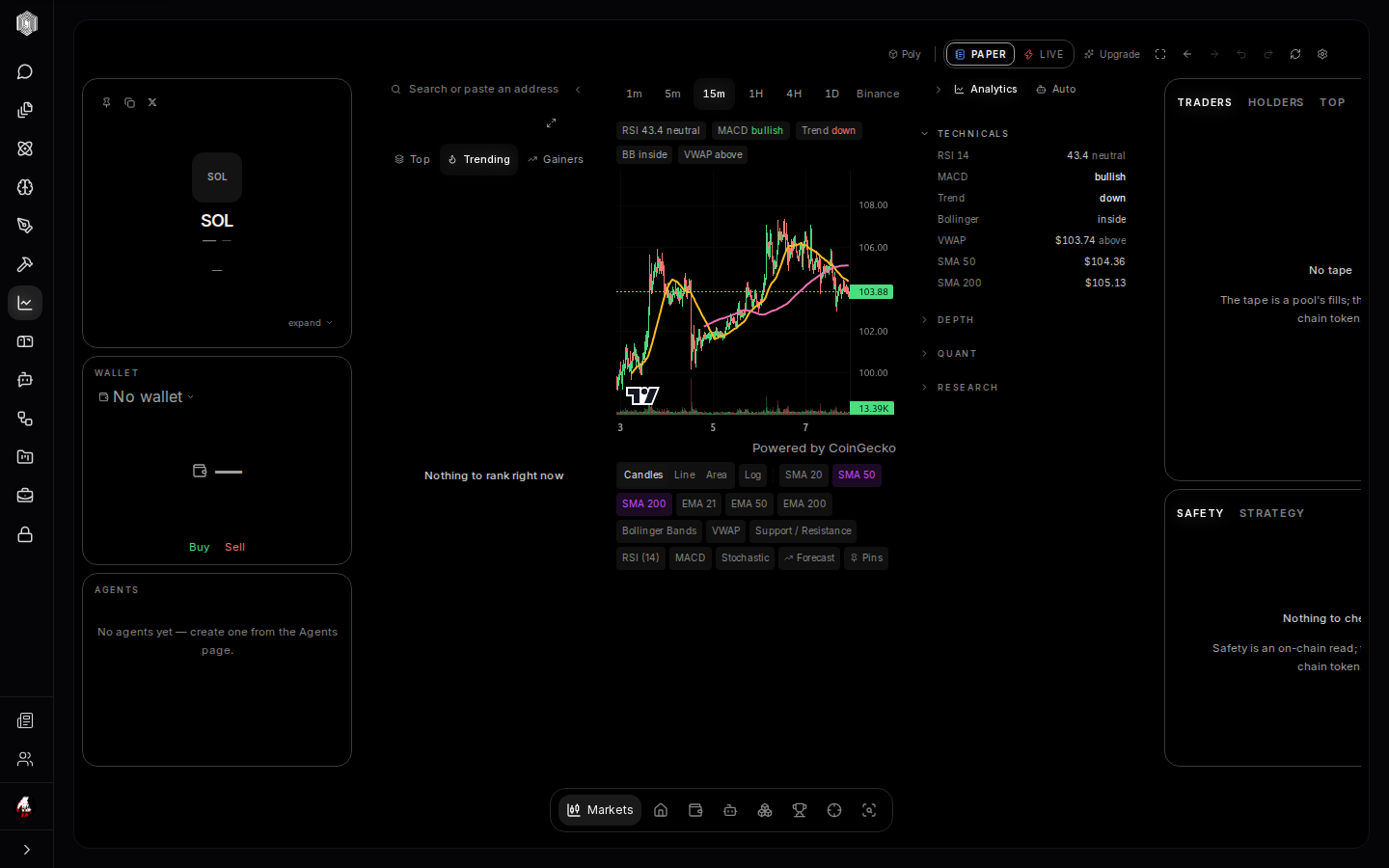
Below the tape sits the check you should never skip. The Safety tab walks a short list of on-chain red flags and ends in a plain verdict — from Verified down to Danger — with the figures behind it: how much of the liquidity pool is locked, how concentrated the holders are, whether the token charges a hidden tax on the way out, and how many holders exist. The verdict comes from third-party scanners (RugCheck, GoPlus) and is not a guarantee. Each finding folds open if you want the detail. The Strategy tab beside it is the token's technical story in one line: whether the signal indicators agree or disagree, with the compact stats underneath. Neither tab tells you to buy or skip; both make sure you are not the last person to know something the chain already shows.
On a phone
The same terminal re-arranges rather than shrinks. A jump strip — Chart, Info, Wallet, Data — hops between sections so you are never scrolling through the chart to reach the ticket, and the buy/sell ticket becomes a bar pinned to the bottom of the screen that opens as a sheet: same live quote, same details drawer, same confirmation, thumb-reachable. The right column's reads fold into the Data stop, with the safety verdict getting top billing. Nothing in this guide is desktop-only; the same features are on mobile — the checks, the quotes, and the confirmations all travel with you, and only the geography changes.