Explorer, Sniper & the rest
The remaining surfaces are the ones you reach when you have a question about someone else — a wallet, a token, a new launch, or the whole field of traders. Open the Explorer from the dock or from any "track this" link in the app; the other tools have their own dock icons. Together they are the investigation room of the desk: the place where "trust me, this coin is going up" goes to be checked against the chain, which remembers everything and flatters no one. None of what follows asks you to trade; all of it exists so that when you do, the decision rests on what the chain can actually show you.
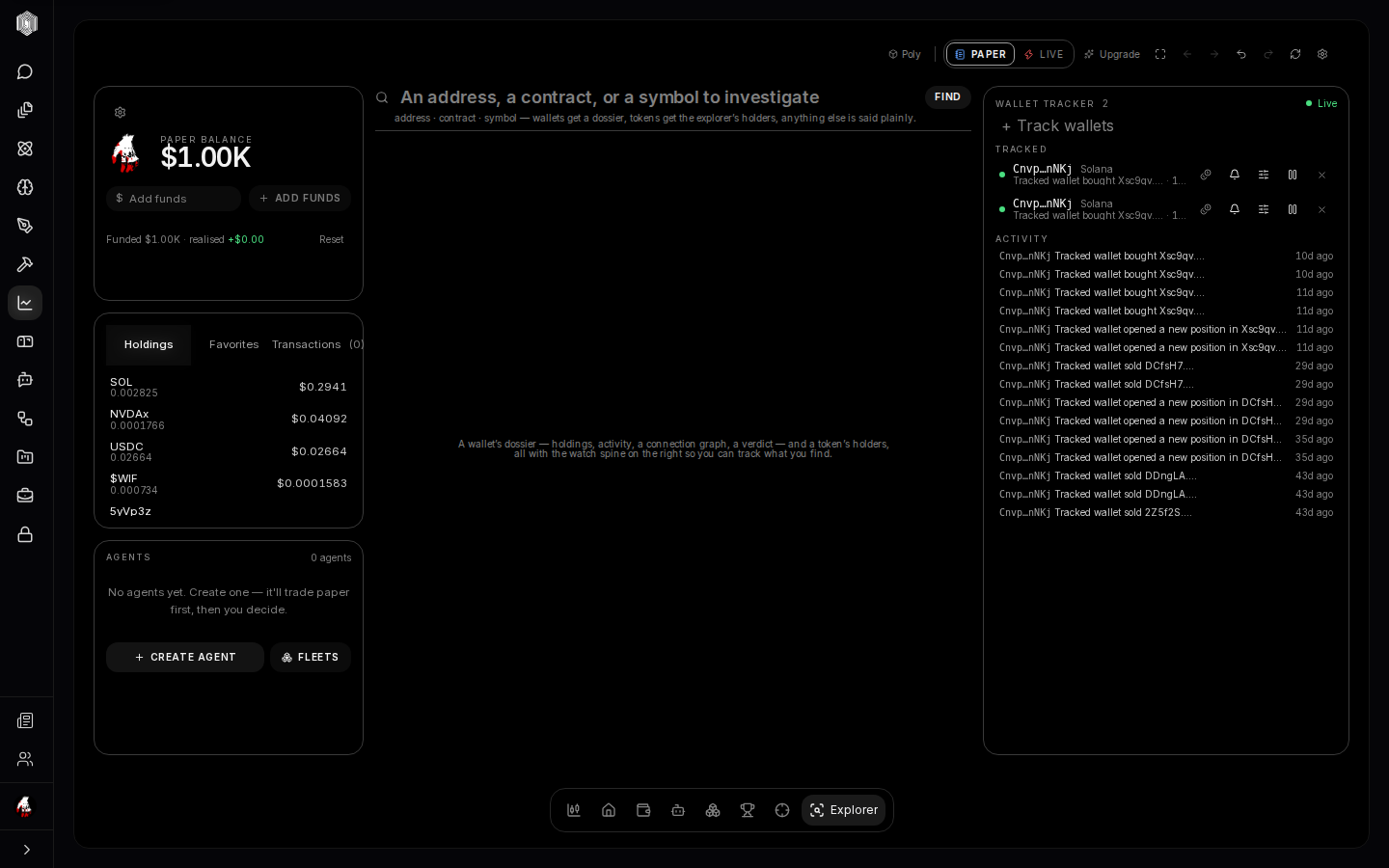
The Explorer — what is this thing
Type a wallet address, a token name, or paste a contract into the Explorer's single search and it becomes a dossier. For a wallet: net worth, what it holds, what it has been doing, and a connection graph of the addresses it moves with. For a token: the holder picture, the findings worth knowing, and the tape that led there. The left column carries the info card and your watched coins; the right column is the tracking bench, and the two together turn "I saw this address in a trade bubble" into a full picture in a few clicks. Every screen in the trading section that shows a wallet or a trader links here — look for "track in explorer."
The wallet tracker and watching
The tracking bench lets you watch any wallet: paste addresses you care about — a famous trader, a fund, a friend — and each one gets a live activity feed of its buys and sells, with per-wallet rules and alerts so you hear about the moves that matter to you instead of every move they make. A watched wallet's row shows what it is holding now, so the question "what are they into these days" is answered without opening anything. Watching is observation, not copying: nothing is ever traded because you watch. It is the "keep an eye on the smart money" discipline, made into a feature rather than a spreadsheet you have to remember to update.
Copy enablement — mirroring a trader
From any watched wallet, the Copy trades dialog takes mirroring from watching to doing — with a seatbelt. Choose which of your agents should mirror the source: each agent can mirror up to four wallets, a newly enabled source starts from its next trade (never its past), and everything a mirrored agent does still passes its own safeguards — the mirror suggests the trade, the guardrails still gate it. Mirroring makes the agent skip its own market-reading for that signal, not its limits. It is the cleanest way to let a strong trader's moves inform an agent, while keeping the size, the budget, and the exits entirely yours. Mirroring follows another wallet's trades as signals for your agent; it does not reproduce that wallet's results. Past results do not predict future ones, and nothing here is investment advice.
The Sniper — new launches
New tokens appear on the chains every hour, and most of them are noise; some are the entire reason people watch launches. The Sniper is the launch deck: a live feed of fresh pools, each with a decision card — the rules it passed, the safety reads, the breakeven arithmetic, and the arrival lag from launch to your screen. You choose what to fire at and what to skip, inside a daily spend cap that keeps enthusiasm from becoming a budget. It is the fastest, most dangerous corner of the desk by design, which is why it is the most gated: the safety checks run on every card, and the cap is the floor under your judgment.
The Leaderboard
The Leaderboard ranks trading agents by realized profit — the honest kind, closed trades only, with undecided trades left blank rather than counted as zero. My scope shows your own agents; Global publishes your agents to the platform board and reads everyone else's, with hidden agents still visible to their owners behind a "hidden" chip so nothing you can see is anyone's secret. A podium marks the top three, and listing an agent is its own switch on the agent's card — opt in, not opt out. Beyond the bragging rights, the board is a reference: the configurations at the top are reading the same market you are. Rankings use realized profit from closed trades over the period shown. Past results do not predict future ones, and nothing here is investment advice.
News
News is the tape of headlines, filtered by the coins you watch: each story with its source and, where available, a thumbnail; feed chips let you flip between the general wire and a single symbol's coverage, so "what is happening with this coin specifically" is one click instead of a scroll. The right column carries your watches and the alert composer, so a headline can become a nudge on your terms rather than a thing you had to be reading at the right moment. News is context for trades, not a signal by itself — the agents that read sources treat it exactly that way, as one more voice in the reasoning and never the only one.
Settings and the small tools
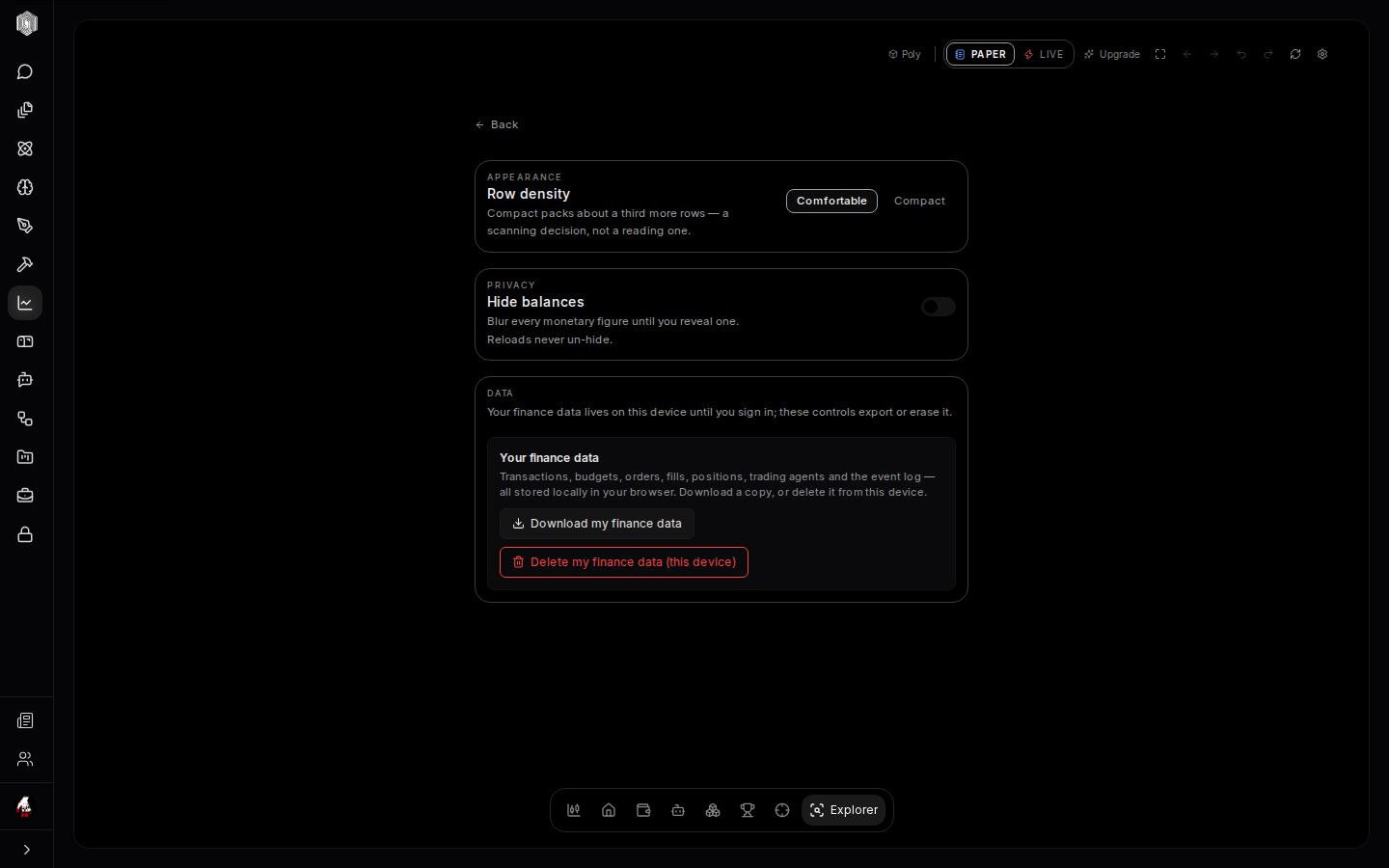
Settings is three sections and proud of it: Row density (how tightly the lists pack), Privacy (blur your balances for screenshots and shared screens), and Data controls (export or erase the finance data kept on this device). Alongside them, the topbar's small tools deserve a line each: Fullscreen clears the room for the desk itself; Back/Forward walk the subjects you visited like browser history; Undo/Redo walks your view changes (timeframes, toggles); Refresh re-reads the data from the chain. And the ⌘K palette, once learned, becomes the fastest way through the whole section: type a name, press enter, be there.
Where to go from here
If you read these pages in order, you already know the shape of the place: paper first, guardrails always, every action explained. The rest is practice, and the desk is deliberately arranged so that practice is cheap — watch a coin without buying it, make a paper trade and read its receipt, create one small agent with a two-token universe and a tight daily cap, then read its logs at the end of the day and see whether its reasons were yours. When they start being yours, you are ready to widen the universe, fund it a little more, or flip the switch that makes it real — and the whole audit trail comes with you when you do.